

使用说明
下面是使用 Qwen/Qwen2.5-VL-7B-Instruct 的相关库、推理服务、Notebook 和本地应用的方法。请通过以下链接开始上手:
- 如何将 Qwen/Qwen2.5-VL-7B-Instruct 与 Transformers 配合使用
- 如何将 Qwen/Qwen2.5-VL-7B-Instruct 与 vLLM 配合使用
- 通过 pip 安装并部署模型
- 使用 Docker
- 如何将 Qwen/Qwen2.5-VL-7B-Instruct 与 SGLang 配合使用
- 通过 pip 安装并部署模型
- 使用 Docker 镜像
- 如何将 Qwen/Qwen2.5-VL-7B-Instruct 与 Docker Model Runner 配合使用
Qwen2.5-VL-7B-Instruct
简介
自 Qwen2-VL 发布以来的五个月里,许多开发者基于 Qwen2-VL 视觉语言模型构建了新的模型,并为我们提供了宝贵的反馈。在此期间,我们专注于打造更有用的视觉语言模型。今天,我们激动地推出 Qwen 家族的最新成员:Qwen2.5-VL。
主要增强:
-
更强的视觉理解能力:Qwen2.5-VL 不仅能熟练识别常见物体(如花、鸟、鱼、昆虫),还具备出色的能力,可以分析图像中的文本、图表、图标、图形和版式。
-
智能体(Agent)能力:Qwen2.5-VL 可以直接作为视觉智能体进行推理,并能动态调度工具,可用于电脑操作和手机操作。
-
长视频理解与事件捕捉:Qwen2.5-VL 能够理解超过 1 小时的视频,并新增了通过定位相关视频片段来捕捉事件的能力。
-
多种格式的视觉定位:Qwen2.5-VL 可以通过生成边界框或点,准确地在图像中定位对象,并能为坐标和属性输出稳定的 JSON。
-
结构化输出:对于发票、表单、表格等结构化数据的扫描件,Qwen2.5-VL 支持对其内容进行结构化输出,可惠及金融、商务等场景。
模型架构更新:
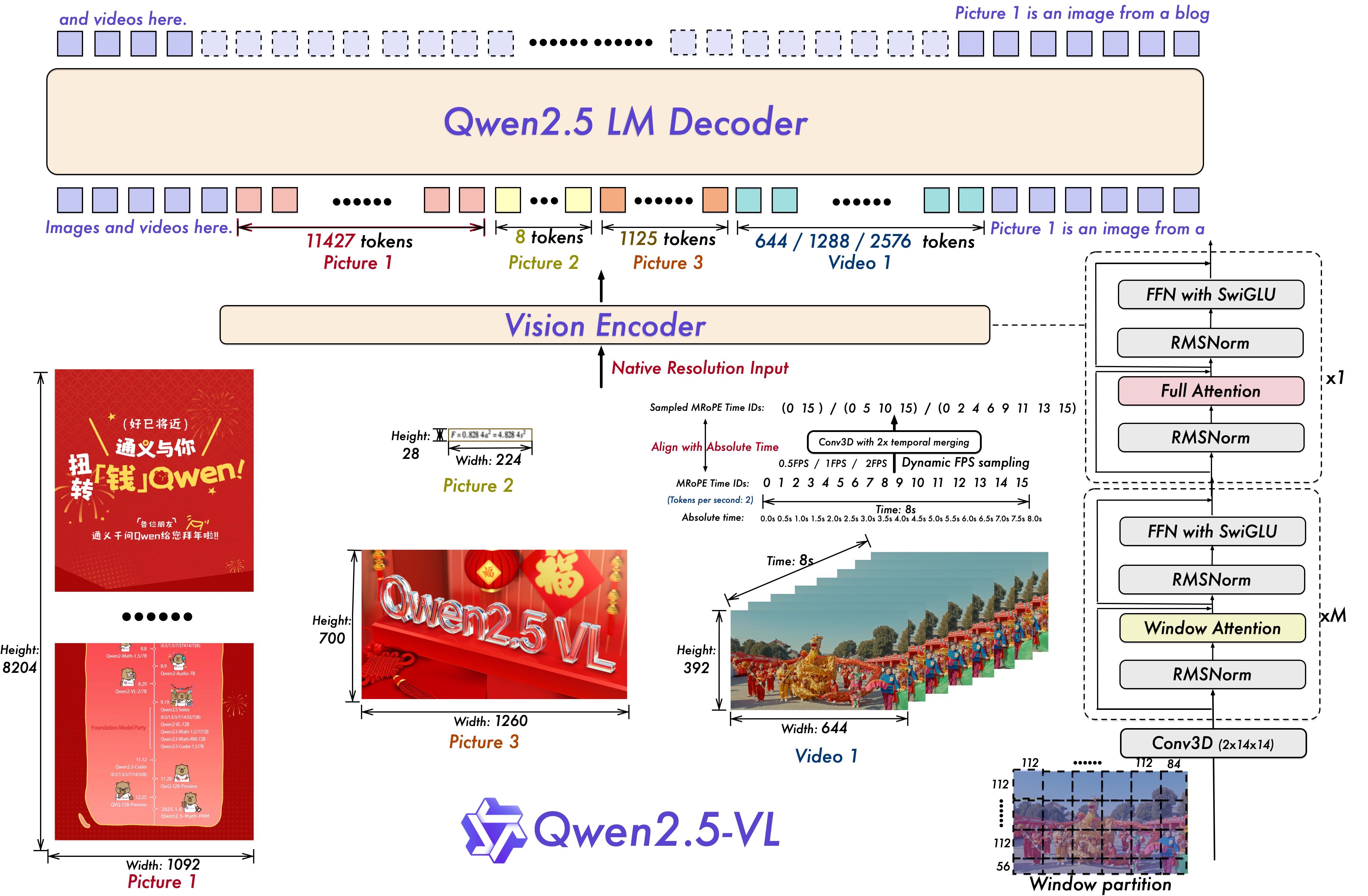
我们将动态分辨率扩展到时间维度,通过采用动态 FPS(每秒帧数)采样,使模型能够以不同的采样率理解视频。同时,我们通过加入 ID 与绝对时间对齐,更新了 mRoPE(多模态旋转位置编码)在时间维度上的实现,使模型能够理解时间序列与速度,并最终获得精确定位特定瞬间的能力。

我们通过在 ViT(视觉 Transformer)中策略性地使用窗口注意力,提升了训练和推理速度。ViT 架构还进一步采用了 SwiGLU(一种激活函数)和 RMSNorm(均方根层归一化)进行优化,使其与 Qwen2.5 LLM 的结构保持一致。
我们提供了三个参数规模分别为 30 亿、70 亿和 720 亿的模型。本仓库包含 70 亿参数的指令微调版 Qwen2.5-VL 模型。更多信息,请访问我们的博客和 GitHub 仓库。
评测
图像基准
| 基准 | InternVL2.5-8B | MiniCPM-o 2.6 | GPT-4o-mini | Qwen2-VL-7B | Qwen2.5-VL-7B |
|---|---|---|---|---|---|
| MMMUval | 56 | 50.4 | 60 | 54.1 | 58.6 |
| MMMU-Proval | 34.3 | - | 37.6 | 30.3 | 41.0 |
| DocVQAtest | 93 | 93 | - | 94.5 | 95.7 |
| InfoVQAtest | 77.6 | - | - | 76.5 | 82.6 |
| ChartQAtest | 84.8 | - | - | 83.0 | 87.3 |
| TextVQAval | 79.1 | 80.1 | - | 84.3 | 84.9 |
| OCRBench | 822 | 852 | 785 | 845 | 864 |
| CC_OCR | 57.7 | 61.6 | 77.8 | ||
| MMStar | 62.8 | 60.7 | 63.9 | ||
| MMBench-V1.1-Entest | 79.4 | 78.0 | 76.0 | 80.7 | 82.6 |
| MMT-Benchtest | - | - | - | 63.7 | 63.6 |
| MMStar | 61.5 | 57.5 | 54.8 | 60.7 | 63.9 |
| MMVetGPT-4-Turbo | 54.2 | 60.0 | 66.9 | 62.0 | 67.1 |
| HallBenchavg | 45.2 | 48.1 | 46.1 | 50.6 | 52.9 |
| MathVistatestmini | 58.3 | 60.6 | 52.4 | 58.2 | 68.2 |
| MathVision | - | - | - | 16.3 | 25.07 |
视频基准
| 基准 | Qwen2-VL-7B | Qwen2.5-VL-7B |
|---|---|---|
| MVBench | 67.0 | 69.6 |
| PerceptionTesttest | 66.9 | 70.5 |
| Video-MMEwo/w subs | 63.3/69.0 | 65.1/71.6 |
| LVBench | 45.3 | |
| LongVideoBench | 54.7 | |
| MMBench-Video | 1.44 | 1.79 |
| TempCompass | 71.7 | |
| MLVU | 70.2 | |
| CharadesSTA/mIoU | 43.6 |
智能体基准
| 基准 | Qwen2.5-VL-7B |
|---|---|
| ScreenSpot | 84.7 |
| ScreenSpot Pro | 29.0 |
| AITZ_EM | 81.9 |
| Android Control High_EM | 60.1 |
| Android Control Low_EM | 93.7 |
| AndroidWorld_SR | 25.5 |
| MobileMiniWob++_SR | 91.4 |
环境要求
Qwen2.5-VL 的代码已合并到最新版 Hugging Face transformers 中,我们建议使用以下命令从源码安装:
pip install git+https://github.com/huggingface/transformers accelerate否则你可能会遇到如下错误:
KeyError: 'qwen2_5_vl'快速上手
下面我们提供简单的示例,展示如何将 Qwen2.5-VL 与 🤖 ModelScope 和 🤗 Transformers 配合使用。
Qwen2.5-VL 的代码已合并到最新版 Hugging Face transformers 中,我们建议使用以下命令从源码安装:
pip install git+https://github.com/huggingface/transformers accelerate否则你可能会遇到如下错误:
KeyError: 'qwen2_5_vl'我们提供了一个工具包,可帮助你像使用 API 一样更方便地处理各种类型的视觉输入,包括 base64、URL,以及图文和视频混合输入。可使用以下命令安装:
# 强烈建议启用 [decord] 功能以获得更快的视频加载速度。
pip install qwen-vl-utils[decord]==0.0.8
如果你的系统不是 Linux,可能无法通过 PyPI 安装 decord。此时可以使用 pip install qwen-vl-utils,它会回退到使用 torchvision 进行视频处理。不过,你仍然可以从源码安装 decord,以便在加载视频时使用 decord。
使用 🤗 Transformers 进行对话
下面展示一个代码片段,演示如何通过 transformers 和 qwen_vl_utils 使用对话模型。
from transformers import Qwen2_5_VLForConditionalGeneration, AutoTokenizer, AutoProcessor
from qwen_vl_utils import process_vision_info

# 默认:将模型加载到可用设备上
model = Qwen2_5_VLForConditionalGeneration.from_pretrained(
    "Qwen/Qwen2.5-VL-7B-Instruct", torch_dtype="auto", device_map="auto"
)

# 建议启用 flash_attention_2 以获得更好的加速和显存节省,特别是在多图像和视频场景下
# model = Qwen2_5_VLForConditionalGeneration.from_pretrained(
#     "Qwen/Qwen2.5-VL-7B-Instruct",
#     torch_dtype=torch.bfloat16,
#     attn_implementation="flash_attention_2",
#     device_map="auto",
# )

# 默认 processor
processor = AutoProcessor.from_pretrained("Qwen/Qwen2.5-VL-7B-Instruct")

# 模型中每张图像的视觉 token 数量默认范围为 4–16384
# 你可以根据需要设置 min_pixels 和 max_pixels,例如将 token 范围设为 256–1280,以在性能和成本之间取得平衡
# min_pixels = 256 * 28 * 28
# max_pixels = 1280 * 28 * 28
# processor = AutoProcessor.from_pretrained(
#     "Qwen/Qwen2.5-VL-7B-Instruct", min_pixels=min_pixels, max_pixels=max_pixels
# )

messages = [
    {
        "role": "user",
        "content": [
            {
                "type": "image",
                "image": "https://qianwen-res.oss-cn-beijing.aliyuncs.com/Qwen-VL/assets/demo.jpeg",
            },
            {"type": "text", "text": "Describe this image."},
        ],
    }
]

# 推理准备
text = processor.apply_chat_template(
    messages, tokenize=False, add_generation_prompt=True
)
image_inputs, video_inputs = process_vision_info(messages)
inputs = processor(
    text=[text],
    images=image_inputs,
    videos=video_inputs,
    padding=True,
    return_tensors="pt",
)
inputs = inputs.to("cuda")

# 推理:生成输出
generated_ids = model.generate(**inputs, max_new_tokens=128)
generated_ids_trimmed = [
    out_ids[len(in_ids):] for in_ids, out_ids in zip(inputs.input_ids, generated_ids)
]
output_text = processor.batch_decode(
    generated_ids_trimmed, skip_special_tokens=True, clean_up_tokenization_spaces=False
)
print(output_text)
# 包含多张图像和一条文本查询的消息
messages = [
{
"role": "user",
"content": [
{"type": "image", "image": "file:///path/to/image1.jpg"},
{"type": "image", "image": "file:///path/to/image2.jpg"},
{"type": "text", "text": "Identify the similarities between these images."},
],
}
]
# 推理准备
text = processor.apply_chat_template(
messages, tokenize=False, add_generation_prompt=True
)
image_inputs, video_inputs = process_vision_info(messages)
inputs = processor(
text=[text],
images=image_inputs,
videos=video_inputs,
padding=True,
return_tensors="pt",
)
inputs = inputs.to("cuda")
# 推理
generated_ids = model.generate(**inputs, max_new_tokens=128)
generated_ids_trimmed = [
out_ids[len(in_ids):] for in_ids, out_ids in zip(inputs.input_ids, generated_ids)
]
output_text = processor.batch_decode(
generated_ids_trimmed, skip_special_tokens=True, clean_up_tokenization_spaces=False
)
print(output_text)
# 包含作为视频的图像列表和一条文本查询的消息
messages = [
    {
        "role": "user",
        "content": [
            {
                "type": "video",
                "video": [
                    "file:///path/to/frame1.jpg",
                    "file:///path/to/frame2.jpg",
                    "file:///path/to/frame3.jpg",
                    "file:///path/to/frame4.jpg",
                ],
            },
            {"type": "text", "text": "Describe this video."},
        ],
    }
]