

OpenRouter · 2026 年 10 月 31 日

简要说明(Tl;dr)——常驻 AI Agent 需要什么?——开始之前——第 1 步:给 Agent 提供工具——第 2 步:编写 Agent 的一次运行——第 3 步:让它持续运行——第 4 步:验证它能在重启后存活——第 5 步:审批它想做的事——第 6 步:把它部署到常开的环境——常驻 AI Agent 的成本是多少?——常见问题——后续步骤——参考资料
常驻 AI Agent 是一个按计划自动唤醒的程序:它使用工具查看某些信息,判断哪些内容重要,并采取行动或向你汇报,而无需你每次都手动触发。在 2026 年的 DevDay 上,OpenAI 发布了 Dots,这是他们版本的常驻 Agent。你也可以自己搭建一个,自行选择模型、工具,以及每次运行可花费的额度上限。
在本教程中,我们用 TypeScript 和 OpenRouter Agent SDK 搭建一个常驻 Agent:它监控 Hacker News 上你选定的主题,把值得阅读的内容写成本文摘要,在重启后仍记得已经看过哪些内容,并且当任何一次运行的花费达到 5 美分时立即停止。每次检查的花费在 0.0003 到 0.0012 美元之间。同样的结构适用于任何应该持续运行的 Agent,例如监控某个代码仓库或状态页面并采取行动的 Agent。
简要说明(Tl;dr)
- 常驻 AI Agent 按计划唤醒,用工具检查某些内容,无需每次被要求就自行汇报或行动。本教程用我们的 Agent SDK
@openrouter/agent0.11.0 以 TypeScript 搭建一个这样的 Agent。 - 在 2026 年 10 月 13 日的运行中,使用 Claude Haiku 5.5 时,每次检查花费 0.0003 到 0.0012 美元;若每 15 分钟检查一次,每月约 0.86 到 3.46 美元。
stopWhen: [stepCountIs(6), maxCost(0.05)]为每次运行设定上限,API 密钥上的额度限制则限定了总花费。- 在工具上设置
requireApproval: true会在该工具执行前暂停运行;下次运行会根据你对这次调用的批准或拒绝结果按 ID 恢复。 - 一个记录已见故事 ID 的文件就是这个 Agent 的长期记忆;每次检查都开启全新的对话,可以让每次检查的成本在数周运行中保持稳定。
常驻 Agent 需要什么?
常驻 Agent 需要四样东西,每样只需几行代码:
- 一个按计划运行 Agent 的循环。
- Agent 用来观察世界并采取行动的工具。
- 能在崩溃或重启后存活的记忆。
- 限制:对每次运行的步骤数和花费设上限,并对任何有后果的操作要求人工审批。
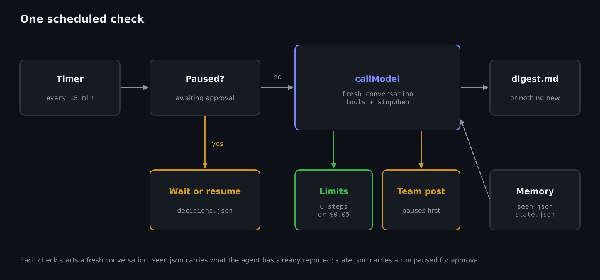
一次按计划执行的检查。有审批待处理时这次运行会被跳过;否则它会开启一段全新的对话,并受到各项限制的约束。
我们的 Agent SDK 负责运行模型和工具调用、应用限制并保存对话,使暂停的运行能够恢复;而你的代码负责调度和记录 Agent 已经看过的故事文件。如果你想了解 SDK 为你做了什么,我们关于构建工具调用 Agent 循环的教程手工写了同样的循环。
开始之前
你需要 Node.js(我们用的是 22 版)和一个 OpenRouter API 密钥。如果还没有密钥,快速入门会带你创建一个。
创建一个项目,安装 SDK、Zod(SDK 用它定义工具的输入 schema)和 tsx(直接运行 TypeScript),然后让脚本能够读取你的密钥:
mkdir watcher && cd watcher
npm init -y
npm pkg set type=module
npm install @openrouter/agent@0.11.0 zod tsx
export OPENROUTER_API_KEY="your-openrouter-key"
把 type 设为 module 可以让脚本使用顶层 await。SDK 仍处于 0.x 版本,因此命令固定使用 0.11.0。
如果你使用 Bun,bun add @openrouter/agent@0.11.0 zod 会安装脚本所需的全部依赖,并且在本教程运行 npx tsx agent.ts 的地方,你可以运行 bun agent.ts。
第 1 步:给 Agent 提供工具
这个 Agent 会获得三个工具:
check_hacker_news通过 Hacker News 搜索 API 搜索最近的帖子,只返回 Agent 尚未看过的那些。write_digest保存一条供你阅读的条目。post_to_team_channel会触达其他人,因此需要你批准后才能运行。
每个工具都有名称、描述、用于输入的 Zod schema,以及一个 execute 函数。如果你来自其他框架,我们关于各 Agent 框架的工具调用 schema 处理方式对比展示了六种框架如何定义相同的组成部分。创建 agent.ts,从导入、设置、记忆和工具开始:
import { OpenRouter, tool, stepCountIs, maxCost, type ConversationState, type StateAccessor } from "@openrouter/agent";
import { z } from "zod";
import { existsSync, readFileSync, writeFileSync, appendFileSync, rmSync } from "node:fs";

const client = new OpenRouter({ apiKey: process.env.OPENROUTER_API_KEY });
const MODEL = "anthropic/claude-haiku-5.5";
const TOPICS = "new AI models, AI agents, and tools for developers who build with LLMs";
const EVERY_MS = Number(process.env.EVERY_MS ?? 15 * 60_000);
const MAX_RUNS = Number(process.env.MAX_RUNS ?? Infinity);

// Memory on disk: which stories the agent has already seen, and the conversation itself.
const SEEN = "seen.json";
const seen: Set<string> = new Set(existsSync(SEEN) ? JSON.parse(readFileSync(SEEN, "utf8")) : []);
// Stories returned during the current run. They join seen.json only when the run finishes,
// so a run that crashes partway doesn't lose them. fetched.json keeps them across a restart.
const FETCHED = "fetched.json";
const fetched: Set<string> = new Set(existsSync(FETCHED) ? JSON.parse(readFileSync(FETCHED, "utf8")) : []);
function markSeen() {
  fetched.forEach((id) => seen.add(id));
  fetched.clear();
  writeFileSync(SEEN, JSON.stringify([...seen]));
  rmSync(FETCHED, { force: true });
}
const STATE = "state.json";
const state: StateAccessor = {
  load: async () => (existsSync(STATE) ? (JSON.parse(readFileSync(STATE, "utf8")) as ConversationState) : null),
  save: async (s) => writeFileSync(STATE, JSON.stringify(s)),
};

const checkHackerNews = tool({
  name: "check_hacker_news",
  description: "Return Hacker News stories from the last 48 hours with at least 20 points that you haven't seen before.",
  inputSchema: z.object({ query: z.string().describe("Search terms") }),
  execute: async ({ query }) => {
    const since = Math.floor(Date.now() / 1000) - 2 * 86400;
    const url = `https://hn.algolia.com/api/v1/search?tags=story&hitsPerPage=20&query=${encodeURIComponent(query)}&numericFilters=${encodeURIComponent(`created_at_i>${since},points>=20`)}`;
    const res = await fetch(url);
    if (!res.ok) throw new Error(`HN search failed: ${res.status}`);
    const hits = (await res.json()).hits as any[];
    const fresh = hits.filter((h) => !seen.has(h.objectID) && !fetched.has(h.objectID));
    fresh.forEach((h) => fetched.add(h.objectID));
    writeFileSync(FETCHED, JSON.stringify([...fetched]));
    console.log(`  check_hacker_news("${query}") -> ${fresh.length} new`);
    return fresh.map((h) => ({ id: h.objectID, title: h.title, points: h.points, comments: h.num_comments, url: `https://news.ycombinator.com/item?id=${h.objectID}` }));
  },
});

const writeDigest = tool({
  name: "write_digest",
  description: "Add a short digest entry for the user. Use only for stories that are genuinely relevant.",
  inputSchema: z.object({ markdown: z.string() }),
  execute: async ({ markdown }) => {
    appendFileSync("digest.md", `\n## ${new Date().toISOString()}\n${markdown}\n`);
    console.log("  write_digest -> digest.md");
    return { saved: true };
  },
});

const postToTeam = tool({
  name: "post_to_team_channel",
  description: "Post a message to the whole team. Only for news the whole team must see today.",
  inputSchema: z.object({ message: z.string() }),
  requireApproval: true,
  execute: async ({ message }) => {
    console.log(`  post_to_team_channel -> "${message}"`); // call your chat API here
    return { posted: true };
  },
});

const tools = [checkHackerNews, writeDigest, postToTeam] as const;
该工具会在把结果交给模型之前,过滤掉 Agent 已经看过的帖子,因此模型无需追踪此前已汇报过的帖子,也不必冒重复汇报同一帖子的风险。
新的 ID 只有在一次运行结束后才会写入 seen.json,所以中途失败的一次运行不会丢它的帖子。在此之前,它们保存在 fetched.json 中,该文件在重启后仍然存在。在测试中,我们在一次返回 20 条新帖子的搜索之后立即杀掉了进程。下一次运行延续了未完成的对话(第 2 步),根据保存的搜索结果写出了摘要,并把全部 20 个 ID 加入了 seen.json,之后的检查发现了 0 条新帖子。代价是:如果一次运行在写出摘要之后失败,可能会把某个帖子列两次。修复重复内容比丢失帖子更容易。